
A good AI detector should help students revise with more confidence, not leave them staring at one number and guessing what went wrong. That was the standard we used when we tested DetectMy.
We wanted to know how it handled writing that sat in different parts of the spectrum: a paper that started with AI and went through human editing, a fully generated class post, and a fully human-written assignment. We also wanted to see whether the tool gave useful direction at the sentence level, because that is where revision actually happens.
By the end of the test, our view was clear. Read on to know more.
How we tested DetectMy
We built the review around three samples because student writing is rarely clean-cut. A draft may be fully original, partly generated, or heavily revised after using AI early in the process. A detector worth using should not only detect AI writing but also handle not-so-obvious cases with at least some restraint.
Here is what we used:
- An expository essay on social media and student attention span, drafted with AI and then revised by a human
- A discussion board post on ethical leadership in business, written fully with AI
- A SWOT analysis of a campus coffee shop, written fully by a human
Our goal was simple:
- Check whether the overall score felt plausible.
- See how useful the sentence breakdown was.
- Judge whether the tool overreacted to the human-written sample.
DetectMy itself notes that no detection system is perfectly accurate and that scores should be treated as one data point rather than final proof. That is the right way to frame a tool like this, especially in academic settings.
How this AI detector online tool works
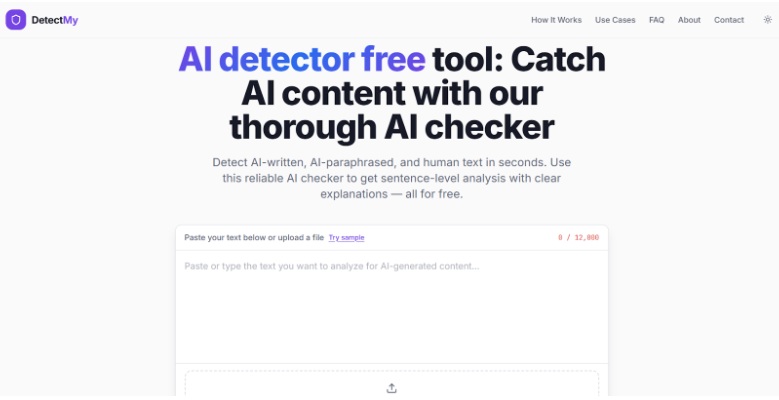
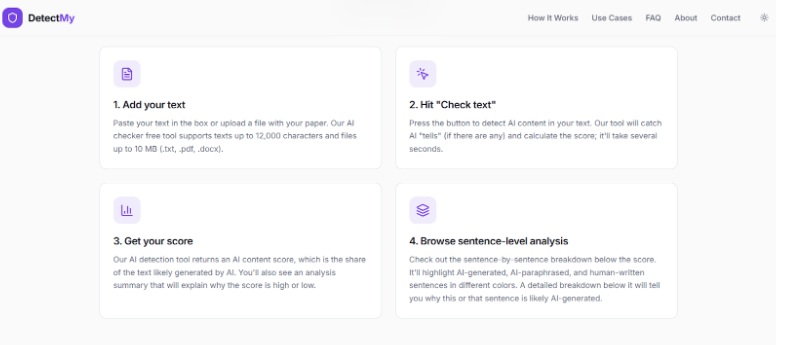
DetectMy gets the workflow right. You paste text or upload a file, run the check, and move straight to the results. The site supports pasted text up to 12,000 characters and file uploads in .txt, .docx, and .pdf formats up to 10 MB.
Here is how our three tests came out:
- AI-drafted, human-edited expository essay: 62% AI
- Fully AI-generated discussion board post: 96% AI
- Fully human-written SWOT analysis: 10% AI
The expository essay gave us the most interesting result. The paper had clearly been improved by a person. Some bland phrases were gone. A few sections had stronger examples. The rhythm felt less synthetic. Still, several sentences kept that polished, overly balanced cadence that AI often leaves behind. DetectMy landed in the middle range, which made sense.
The discussion board post was the easiest case. It had all the familiar signs: smooth phrasing, broad claims, tidy transitions, and very little texture. The high score felt earned. Sentence after sentence looked predictably AI-generated.
The SWOT analysis was where the tool had to prove it could stay calm. The draft was specific, a little uneven in places, and grounded in realistic details about foot traffic, lunch-hour demand, nearby competition, and limited seating. That came back low in terms of likely AI content, which is exactly what we wanted to see.
We can also see where this fits into a broader student workflow. A student might use tools such as Math GPT to understand a complicated method before writing their own explanation from scratch. In this case, a detector becomes useful when it helps you inspect the final wording rather than punish the whole drafting process.
Is DetectMy worth using as an AI detector for free?
DetectMy gives students enough access to decide whether the workflow suits them. That is important. A lot of free tools offer one headline number and very little else. Here, the useful part is visible right away.
What we liked most:
- The results feel readable rather than cluttered.
- The sentence-level breakdown is easy to scan.
- Mixed-content cases get more nuance than a flat pass/fail.
- The tool avoids sounding overconfident about its own judgment.
DetectMy explains that it looks for predictable patterns in sentence structure, vocabulary, and variability, and it separates human-written, AI-generated, and AI-paraphrased content into different categories. It also includes confidence information and explanations for flagged lines.
For students, that creates a straightforward revision path:
- Run the paper through the checker.
- Look at the flagged lines first.
- Rewrite the sentences that sound generic or over-smoothed.
- Add specifics, examples, and more natural phrasing.
- Recheck only if the edits were substantial.
That is a much better use of time than rebuilding a whole paper because one score looked scary.
Is DetectMy an accurate AI detector?
After these tests, we indeed can call DetectMy an accurate AI detecting tool. What gave us confidence was not perfection. It was proportion:
- The fully generated sample scored high.
- The fully human sample stayed low.
- The mixed sample landed in the middle.
That is the pattern you want. It suggests the tool is sensitive to differences in writing texture rather than flattening every polished paragraph into the same accusation.
The sentence view is the strongest part of the experience. DetectMy highlights AI-generated, AI-paraphrased, and human-written sentences in different categories, then adds explanations about why a given line was flagged. Instead of wondering what triggered the score, you can move directly to the risky parts and revise them.
Our verdict on DetectMy
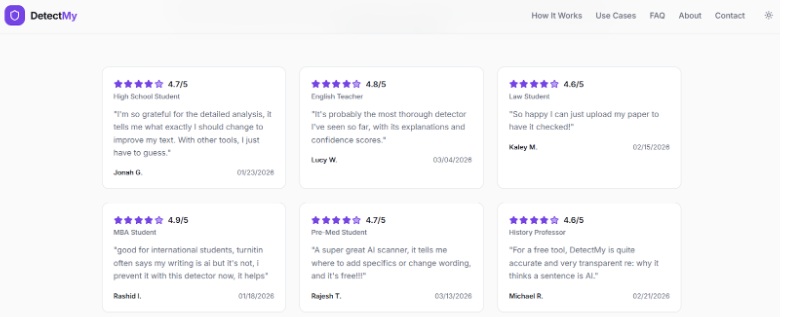
DetectMy’s free AI detector is most useful when you treat it as a revision tool, not a final verdict. It handled obvious machine-written content well, stayed measured with fully human work, and gave the mixed draft a believable middle-ground result.
The sentence-level view is what makes the tool worth using. It shows where the wording still sounds too polished, too generic, or slightly detached from how a student would naturally explain the idea. That gives you something to work with before submission.
Students who want an AI detector for text they can actually revise against will probably find DetectMy more helpful than tools that only flash one score. The tool helps you find the lines that deserve another pass, clean them up, and move on with more confidence.