
AI detection has become one of those student worries behind every polished essay. You write a paragraph, clean it up, fix the grammar, and suddenly wonder if it sounds too smooth.
This review looks at what aiscanner.io shows when you run text through it. I tested different samples, from a student paragraph to an AI-written response, to see how useful the results felt. Find out whether a free detector can give students and educators clear signals without making the process stressful.
What AIScanner.io Does
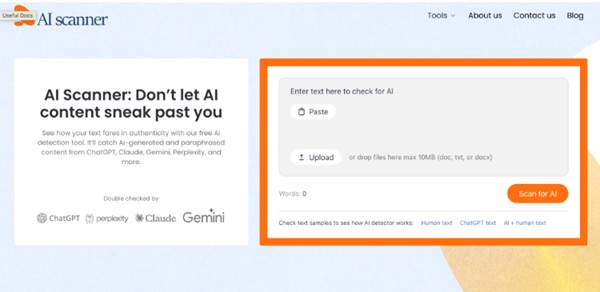
AI Scanner checks whether text may have been written by AI. The tool scans up to 3,000 words, which covers many essays, discussion posts, and short research drafts.
The biggest advantage is access. You do not need to create an account or move through a long setup screen. I pasted text, clicked the scan button, and got a percentage score with sentence-level feedback.
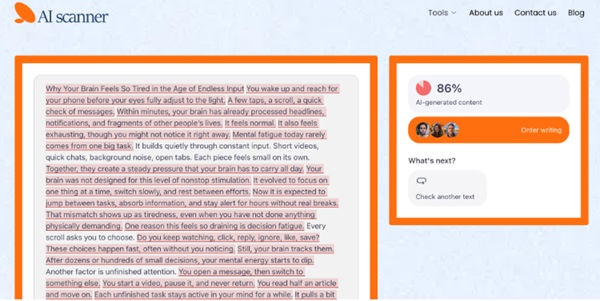
That sentence view matters. A single number can feel vague when your draft mixes your own writing with AI-assisted passages. With AI Scanner, you can see which parts look most suspicious and decide what needs closer review. The platform also has tools for plagiarism checking, paraphrasing, and humanizing.
How I Tested the AI Detector Tool
I tested AIScanner.io with four sample texts. Here was my testing setup:
- a 280-word human-written reflection on remote learning for a first-year college course;
- a 320-word AI-generated explanation of climate change for a high school science assignment;
- a 300-word AI-generated paragraph about financial literacy, lightly edited by a human;
- a 450-word mixed draft about social media and mental health, using both human and AI-written sections.
The first text came from a personal angle. It used specific details, uneven rhythm, and a few casual phrases. AI Scanner marked it as 0% AI-generated. The writing, indeed, had a clear human voice.
The second sample was fully AI-written. It had neat transitions, balanced phrasing, and that familiar textbook tone. AI Scanner returned 86% AI-generated, with most sentences flagged.
The third sample was trickier. I took an AI paragraph about budgeting in college, changed several phrases, added one personal example, and shortened a few sentences. AI Scanner gave it 68% AI-generated. That score made sense because the structure still felt machine-shaped.
Mixed Draft Test: Where the Results Got Useful
The mixed draft was close to a real college scenario. I wrote the introduction myself, used AI for one body paragraph about research findings, then wrote the conclusion manually. The topic was social media and student anxiety, aimed at an introductory psychology class.
AI Scanner marked the full text as 42% AI-generated. The sentence-level insights made it clearer.
The introduction showed a low AI signal because it had a specific viewpoint and natural variation. The AI-assisted body paragraph showed stronger flags.
This is where the AI scanner detector felt most helpful. It showed where the writing changed tone. For students, that can be a useful warning. For educators, it can point to the passages worth discussing.
What the Scores Mean in Practice
AI detection scores should be treated as signals, not final proof. A high score can suggest that writing deserves closer review, but it should never be the only basis for an academic decision.
Here is how I would read the results:
- 0% to 20%: likely human, but still worth checking for generic phrasing;
- 21% to 50%: mixed or polished text that may need a closer look;
- 51% to 80%: strong AI signal, especially if many sentences are flagged;
- 81% to 100%: very likely AI-written or heavily AI-assisted.
False positives can happen. A student who writes in formal English, uses repeated academic phrasing, or speaks English as a second language may get flagged unfairly by any AI text scanner. False negatives can happen, too, especially when AI text has been heavily rewritten.
Use the score as a starting point. Check drafts, notes, version history, sources, and the student’s usual writing style.
Who Will Get the Most Value From AI Scanner?
AI Scanner makes the most sense for students, teachers, tutors, and academic support teams.
Students can use it before submitting essays, scholarship drafts, or discussion posts. It can help you notice when a paragraph sounds too automated after editing. Teachers can use it to review suspicious passages and prepare better follow-up questions. Tutors can use it during writing sessions to show students how tone shifts across a draft.
You can paste a paragraph from a group project, scan a revised introduction, or check a section that feels too polished compared with the rest of your paper.
As an AI text detector, it feels approachable because the workflow is direct. Paste, scan, read the percentage, then look at sentence-level signals.
Rating Breakdown
| Category | Rating | Notes |
| Ease of Use | 10/10 | The scan box is simple, and sign-up is not required. |
| Clarity of Results | 8.5/10 | The percentage is easy to understand, and sentence-level feedback adds practical value. |
| Student Usefulness | 9/10 | Free access and the 3,000-word limit cover many academic needs. |
| Depth of Analysis | 8/10 | It gives enough detail for review, though users still need judgment. |
| Overall Rating | 8.8/10 | A strong free option for quick AI writing checks. |
Final Verdict
AI Scanner gives you a practical look at how your writing may be read by an AI detection system. In my tests, it handled human, AI-written, lightly edited, and mixed samples in a way that felt mostly accurate and easy to interpret.
The best part is the mix of speed and sentence-level insight. You can see the score, review flagged areas, and decide what to revise or question next.
Try AI Scanner when you want a fast second opinion on your draft. Use the result carefully, pair it with your own judgment, and treat it as one useful clue in a bigger writing review process.